
Pico workshop with Hack(Her) 413!
This past weekend, I had the opportunity to teach a workshop showing students how to use a pico!
We used a temperature sensor to get a reading. We wrote the script using python.
If you are new to picos, here is a tutorial!
1) Hold the BOOTSEL button while connecting the USB cable to your computer
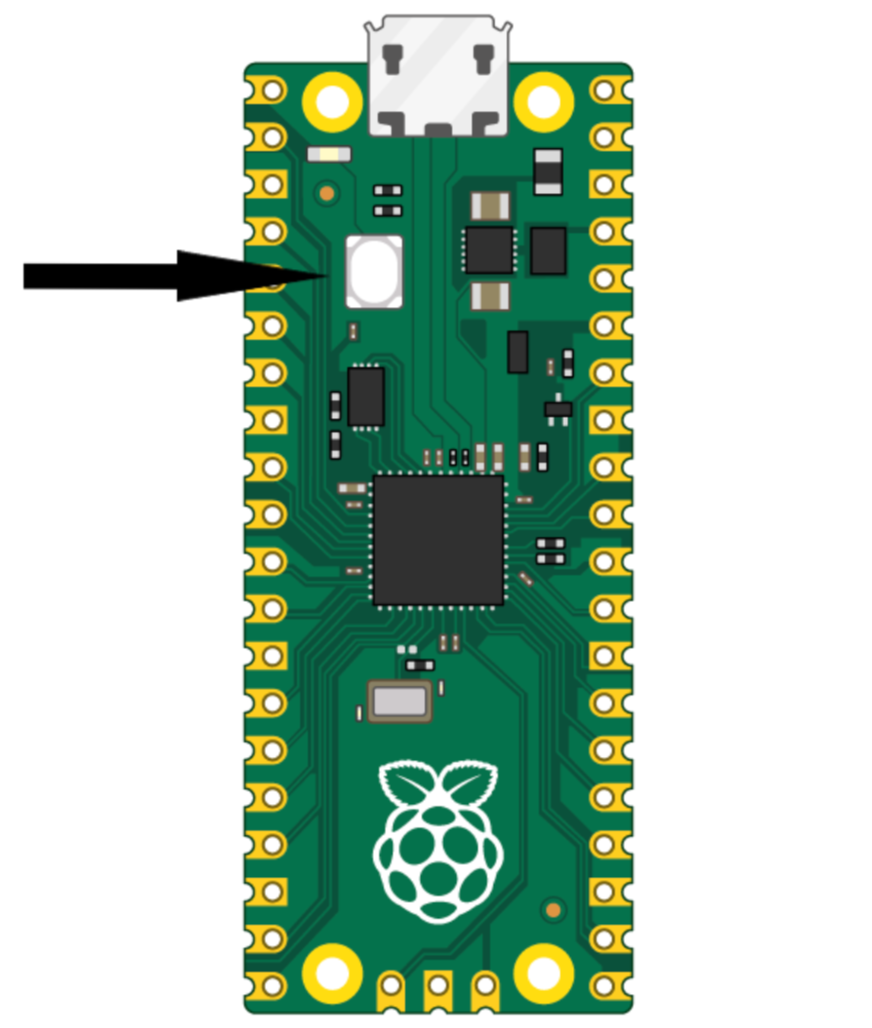
2) Download Thonny onto your computer
3) Download the correct uf2 file (depends on the board) and drag into the RP2350 icon in your files
3) On the bottom left, hit the Local Python 3 -> Install MicroPython and follow the instructions
Now you are set up!
All you have to do next is wire up your temperature sensor and print the readings!
If you wanted to use the on-board temperature sensor (the IRL workshop used an external sensor, you just had to be there), here is how to do that:
1) The sensor is connected to ADC pin 4 and the pico has an ADC with 16 bit resolution so 2^16=65535
2) convert the ADC value to voltage - the pico uses 3.3V —> (3.3/65535)*ADC Value
3) convert volts to temperature - the formula to do this is in the RP2040 datasheet —>
27 - (volt - 0.706)/0.001721